ShopDreamUp AI ArtDreamUp
Deviation Actions




Description
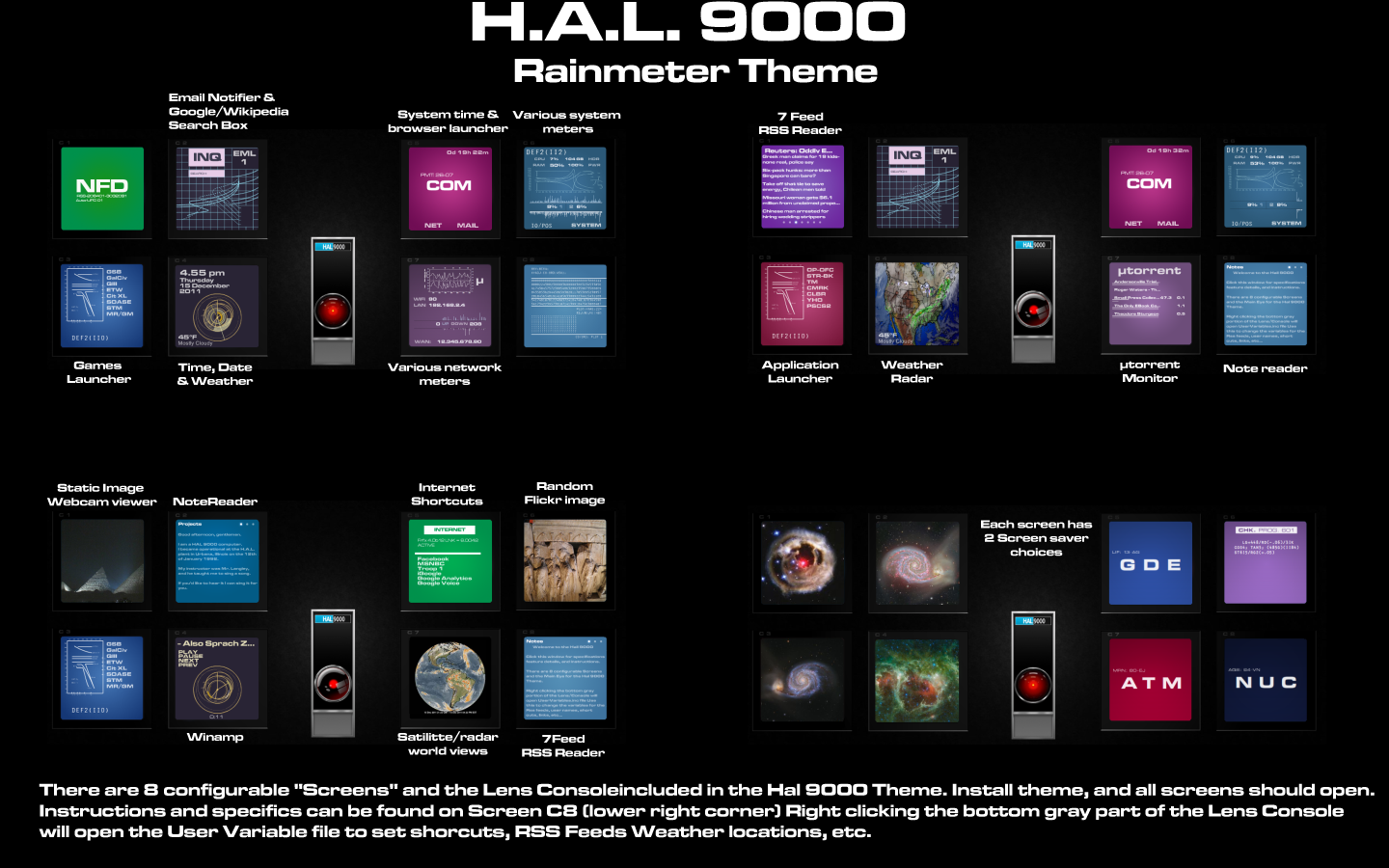
The HAL 9000 Rainmeter Theme
This theme is designed for a desktop that is at least 1440x900
8 customizable Screens and HAL's main Lens/Console
All screens should open automatically, but if not, open HAL.ini in the SKINPATH/Hal/eye folder. When the Console/Lens skin opens, click the blue & black HAL 9000 label, which will open all 8 screens. Right clicking the bottom gray area of the console will open the UserVariable.inc file, which will allow you to configure all of HAL's variables.
The "C8" screen (skinpath/hal/c8/c8.ini) should open on the lower right with an instruction file loaded in it. Please read that for more information.
Features include:
7 feed RSS reader
Temperature and weather forecast
GMail monitoring
Wikipedia/Google Search
Various System and Network monitors
6 Note editors/displays
Random Flickr images
Updated weather radar images
Static image webcam feeds
Winamp controller
Links and shortcuts
2 Screensavers for each screen
Easily customized
Poke HAL in the eye and he talks to you.
This skin was inspired by Hal by ~OsricWuscfrea [LINK]
This theme was made by tearing apart and reusing code from the following:
ENIGMA By ~Kaelri
Circuitous Weather By ~adytzu2005
Arcs By ~Kaelri
Newspaper Desktop By ~Tatenokai
Weather for Rainmeter By ~garbanzox
Flickr Slideshow By ~jxns66
Extended Utorrent By Shadowsteve
I am aware that the cam, satellite and flickr feed sometimes freeze and require that you exit rainmeter completely and restart for them to enable. (or you can simply put it on a different setting and not look at the blank screen) I have no idea how to fix that, sorry.
This is my first skin/theme, so asking me how to get it to work will get the stock answer of "Fiddle with it till it works"
This theme is designed for a desktop that is at least 1440x900
8 customizable Screens and HAL's main Lens/Console
All screens should open automatically, but if not, open HAL.ini in the SKINPATH/Hal/eye folder. When the Console/Lens skin opens, click the blue & black HAL 9000 label, which will open all 8 screens. Right clicking the bottom gray area of the console will open the UserVariable.inc file, which will allow you to configure all of HAL's variables.
The "C8" screen (skinpath/hal/c8/c8.ini) should open on the lower right with an instruction file loaded in it. Please read that for more information.
Features include:
7 feed RSS reader
Temperature and weather forecast
GMail monitoring
Wikipedia/Google Search
Various System and Network monitors
6 Note editors/displays
Random Flickr images
Updated weather radar images
Static image webcam feeds
Winamp controller
Links and shortcuts
2 Screensavers for each screen
Easily customized
Poke HAL in the eye and he talks to you.
This skin was inspired by Hal by ~OsricWuscfrea [LINK]
This theme was made by tearing apart and reusing code from the following:
ENIGMA By ~Kaelri
Circuitous Weather By ~adytzu2005
Arcs By ~Kaelri
Newspaper Desktop By ~Tatenokai
Weather for Rainmeter By ~garbanzox
Flickr Slideshow By ~jxns66
Extended Utorrent By Shadowsteve
I am aware that the cam, satellite and flickr feed sometimes freeze and require that you exit rainmeter completely and restart for them to enable. (or you can simply put it on a different setting and not look at the blank screen) I have no idea how to fix that, sorry.
This is my first skin/theme, so asking me how to get it to work will get the stock answer of "Fiddle with it till it works"
Comments27
Join the community to add your comment. Already a deviant? Log In
I'm new to this site. I don't see a way to download this app. Is it still usable with Windows 10?